Wedding DJ Website Layout: What to Put Where
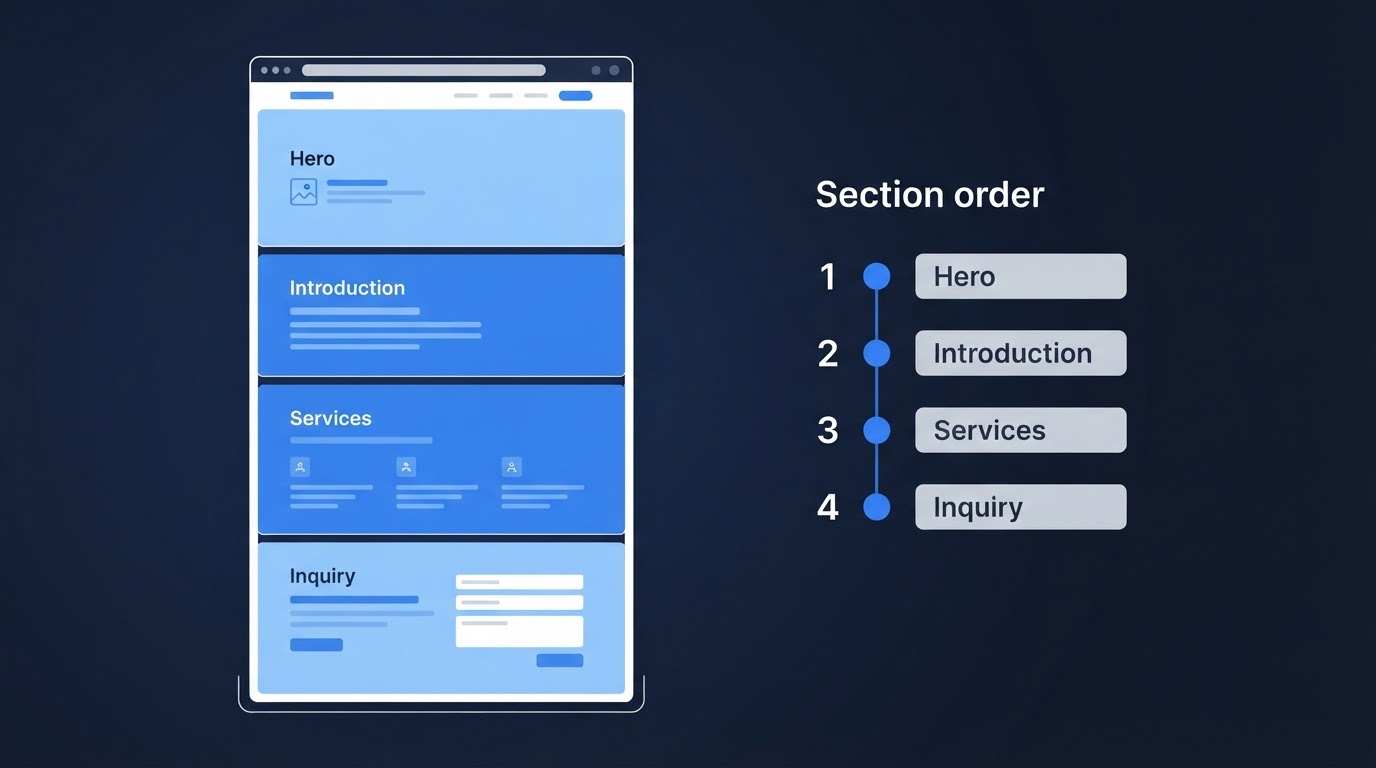
A useful wedding DJ website layout helps visitors understand your business, explore your services, and find a clear way to contact you.
One practical starting point is an introduction, relevant examples of your work, service information, genuine reviews, and an inquiry section. The order can change depending on your business and what visitors need to know.
There is no single layout that guarantees more inquiries. Use the structure below as a starting point, then check whether it works with your actual content and on a phone.
Start with the information visitors need first
The opening section should give someone unfamiliar with your business enough context to keep exploring.
Include:
- Your business name.
- The DJ services you provide.
- Your service area.
- A relevant image, if available.
- A clear next step.
A fictional DJ might use “Wedding DJ and MC services in San Diego County” as the main introduction, followed by a short sentence about their approach.
A creative headline can work too, as long as nearby text explains the service and location.
Choose a main button label that matches its destination. “Request a Quote” should lead to a quote inquiry. “Schedule a Consultation” should lead to scheduling a conversation.
Do not label an inquiry button “Book Your Date” if submitting the form does not reserve the event.
Use this page structure as a starting point
| Section | What to include | What it helps visitors understand |
|---|---|---|
| Opening introduction | Business name, services, area, relevant image, main action | Who you are and whether your business is relevant |
| Experience and event examples | A short introduction and selected real photos or clips | Your approach and the work you actually do |
| Services and coverage | Event coverage, included services, options, and useful price guidance | What they could hire you to provide |
| Genuine feedback | Relevant reviews with truthful attribution | What previous clients chose to share |
| Inquiry and next steps | Contact options, a focused form, or consultation scheduling | How to continue and what happens next |
Swipe to view all columns →
You can combine sections or change their order. For example, a DJ whose personality is central to the business may introduce themselves earlier. A business with several DJs may need to explain the team and assignment process.
Put information where it helps answer a visitor’s next question rather than following the table rigidly.
Introduce the person or team behind the business
Include a short explanation of who provides the service and how you work.
For a solo DJ, a clear portrait and a few relevant sentences may be enough to introduce the person behind the name.
For a team, explain who handles inquiries and how the event DJ is selected. Do not imply that the person pictured performs at every wedding unless that is true.
Keep the introduction focused on details a potential client can use. Longer background information can live on an About page.
Use accurate experience claims and relevant examples rather than unsupported descriptions such as “the area’s number-one DJ.”
Place event examples near the services they illustrate
Photos and clips are more useful when visitors can understand their context.
A ceremony setup photo can sit beside ceremony coverage. Reception imagery can support an explanation of DJ and MC services.
Use real work you have permission to publish. Do not present generated scenes, stock photography, or demonstration setups as paid client events.
You do not need a large gallery between every section. Select examples that add information and avoid repeating nearly identical images.
If you use video, keep essential service information available in text. Visitors should not have to play a clip to learn what you offer.
Make services and coverage easy to compare
Explain what someone can hire you to do.
Depending on your business, that might include:
- Ceremony sound.
- Cocktail-hour music.
- Reception DJ coverage.
- MC services.
- Lighting.
- Additional coverage or equipment.
Distinguish included services from optional additions.
If you offer packages, use consistent categories so visitors can compare them. If you offer one main service with options, explain that directly.
On a phone, check whether package information stays readable. A wide comparison table may need horizontal scrolling or a different presentation. Important information should not disappear simply because the screen is smaller.
For more detail about explaining packages and costs, see how your DJ website can help couples understand your pricing.
Put genuine reviews where they add context
Reviews can appear in one section or beside relevant information.
For example, feedback about preparation may fit near your planning process. A comment about MC services may fit near reception coverage.
Use genuine feedback and preserve its meaning. Attribute reviews truthfully and link to the original public source where appropriate.
Do not invent ratings, awards, or verification badges. A review widget or platform name alone does not guarantee authenticity.
If you do not have relevant reviews yet, focus on accurately explaining your services and showing your work. Do not fill the gap with fictional testimonials.
The guide to building more trust online covers additional ways to present your business honestly.
Make the inquiry section straightforward
Once someone wants to contact you, the next step should be easy to find.
Use a clear heading and explain what happens after the inquiry. Ask for the information you need at that stage, such as the event date, venue, requested services, and contact details.
Mark required fields clearly. Avoid making the initial inquiry feel like a complete wedding-planning questionnaire.
If you offer a consultation calendar, explain that it schedules a conversation. It does not reserve the wedding date.
See the guide to adding a consultation calendar to your DJ website for more about setting expectations.
Test the inquiry process yourself. A form success message does not prove that the message arrived. Trace a test submission through to the destination inbox or connected system.
Repeat contact options where they are useful
A longer page may benefit from a contact option after the services section and another near the end.
You do not need a button after every paragraph. Repeated buttons should help visitors act when they have enough information.
Keep labels consistent when they lead to the same action. Use different labels when the actions differ.
Visitors may enter through an About page, a service page, or a blog post rather than your homepage. Check whether those pages also provide a relevant route to contact you.
Review the mobile order
A desktop layout can place information side by side. On a phone, those elements usually stack.
Review the actual mobile page to check:
- Whether headings appear before the content they introduce.
- Whether photos remain connected to the relevant explanation.
- Whether package details and lists are readable.
- Whether navigation opens and closes properly.
- Whether buttons and form fields are usable.
- Whether anything overlaps or extends beyond the screen.
- Whether the inquiry or consultation process works.
Do not assume the mobile order is correct because the desktop version looks organized.
For broader presentation guidance, see how to make your DJ website look more professional.
A hypothetical layout adjustment
Imagine a solo DJ whose homepage opens with a large gallery, followed by a long biography. Their service area and inquiry form appear near the bottom.
The DJ could add a clearer opening introduction, shorten the biography, group relevant photos with service descriptions, and provide a contact option after the services.
These changes would make key information easier to locate. They do not prove the original order caused low inquiries or that the revised order will produce more bookings.
If inquiries are low, also investigate traffic relevance, message delivery, and the inquiry process. The guide to why your DJ website isn’t getting inquiries explains those different possibilities.
Choose a structure that fits your business
Your layout should reflect how your business operates.
A solo DJ may emphasize personal connection. A performance-focused DJ may lead with relevant event footage. A team may need more explanation of staffing and service options.
Compare the three DJ website design examples to explore different approaches.
Use them to assess presentation and structure. They are demonstration designs, not evidence that one layout produces better booking results.
Frequently asked questions
Does every DJ website need this exact section order?
No. Use the structure as a starting point. Change the order when it helps explain your business or answer a visitor’s questions more clearly.
Should everything go on the homepage?
No. The homepage can summarize your business and link to useful detail elsewhere. Give important topics enough space without repeating the same information across every page.
Should reviews come before services?
Either can work. Consider what context the review needs and what visitors need to understand first. There is no universal order that guarantees more inquiries.
Will changing the layout fix low inquiries?
It may address problems with finding or understanding information. Low inquiries can also involve traffic, service fit, availability, or message delivery. Review the evidence before treating layout as the main cause.
Get help organizing your DJ website
DJ Web Studio offers a customized website for $297 setup + $49/month, including hosting and routine minor updates.
We can help connect an existing compatible booking app or provide an included consultation calendar. Third-party app subscriptions may cost extra. Optional marketing services are separate.
Related Articles
How to Make Your DJ Website Look More Professional
Practical ways to improve your DJ website with real photos, readable text, consistent styling, clear services, mobile checks, and easy contact options.
How to Add a Consultation Booking Calendar to Your DJ Website
A consultation calendar lets couples schedule a call without the back-and-forth emails. Here is how to set it up, place it, and test it on a DJ website.
Wedding DJ Website Maintenance: What to Update After Launch
A professional website is not a one-time project. Here is a practical guide to the content and technical updates that keep a wedding DJ website working after launch.